
Layouts and decks
The main screen follows how you play: the number of decks, who mixes, and what drives each deck change what each lane shows. You can also give the whole window to the library, or spread Prisme over two screens.
Two decks or four
Section titled “Two decks or four”Prisme starts with two decks, A and B. To play four, open Settings > DJ > Decks and choose 4. The audio restarts with the new decks at once, without waiting for Apply: change it before the set.
Four decks
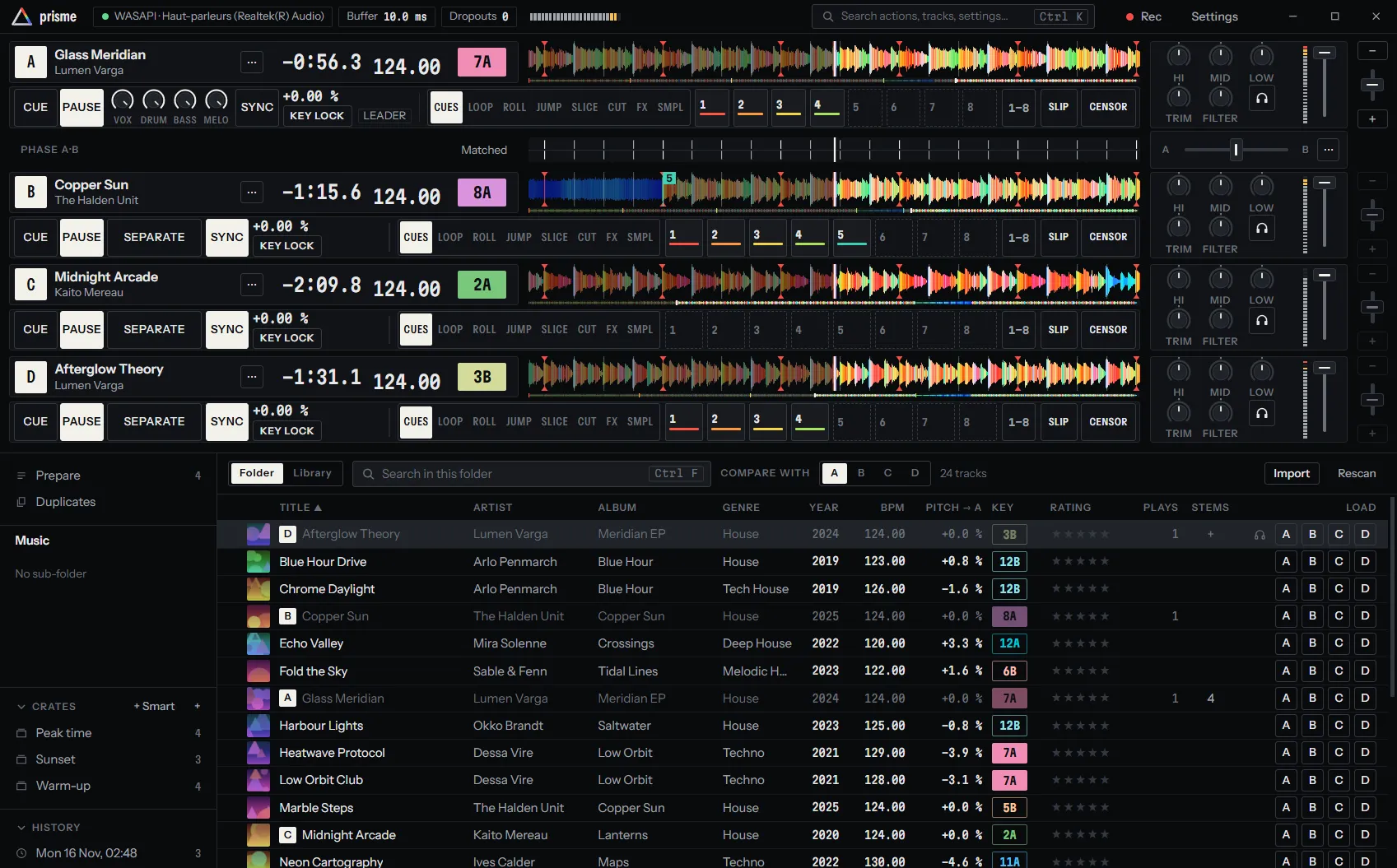
Section titled “Four decks”With four decks, the lanes become compact so that the four fit with the library:
- the deck panel holds on one line: the letter, the title, who drives the deck, and the remaining time, BPM and key without their labels;
- the waveform is half as high, its overview a thin line under it, with no room for the stem lanes;
- with the software mixer, each channel spans the height of its lane.
What else changes:
- The phase strip, under deck A, compares the first two decks that play, and names them (Phase A·C).
- The crossfader: decks A and C are on its left, B and D on its right.
- The keyboard plays decks C and D with the keys of decks A and B, Shift held. See Decks C and D.
- The library has a load button per deck, and Compare with offers the four decks.
Four decks on an interface for two
Section titled “Four decks on an interface for two”A DJ interface with four outputs and four inputs has a pair of outputs and a turntable for two decks. On such an interface, C is a layer over A and D a layer over B, as on a controller with two jog wheels:
- C shares the outputs and the turntable of A; D those of B.
- The deck you put on REL or ABS takes the turntable. The other deck of the pair plays on by itself, at the tempo and in the direction its record gave it.
On an interface with a pair of outputs (and of inputs) per deck, eight of each, every deck has its own: C on outputs 5-6 and inputs 5-6, D on 7-8.
See Setting up vinyl control for the turntables.
External mixer or software mixer
Section titled “External mixer or software mixer”Settings > Mixing > Mixing changes the lanes too:
| External mixer | Software mixer | |
|---|---|---|
| Channel at the end of each lane | None | Trim, EQ with kills, filter, headphones, level meter and fader |
| Beside the deck’s letter | A thin meter of the level sent to its outputs | Nothing: the channel has its own meter |
| Phase strip | The phase only | The phase, the crossfader, the microphone’s key and the mixer’s menu |
The external mixer leaves the screen to the waveforms and the library. See Sound card and latency.
A deck on a record
Section titled “A deck on a record”When a turntable drives a deck (REL or ABS), its lane loses what the turntable does itself:
- no CUE and PLAY keys on the rail;
- no − and + keys by the pitch fader, which shows the pitch played instead of being moved. A notch on it marks where to bring the turntable’s pitch to match the other deck, and the rail shows that pitch (→ +1.2 %).
When the needle reaches the end of the record, the deck goes to INT and plays on by itself until you hand it back with REL or ABS. See Vinyl control modes.
The library over the whole window
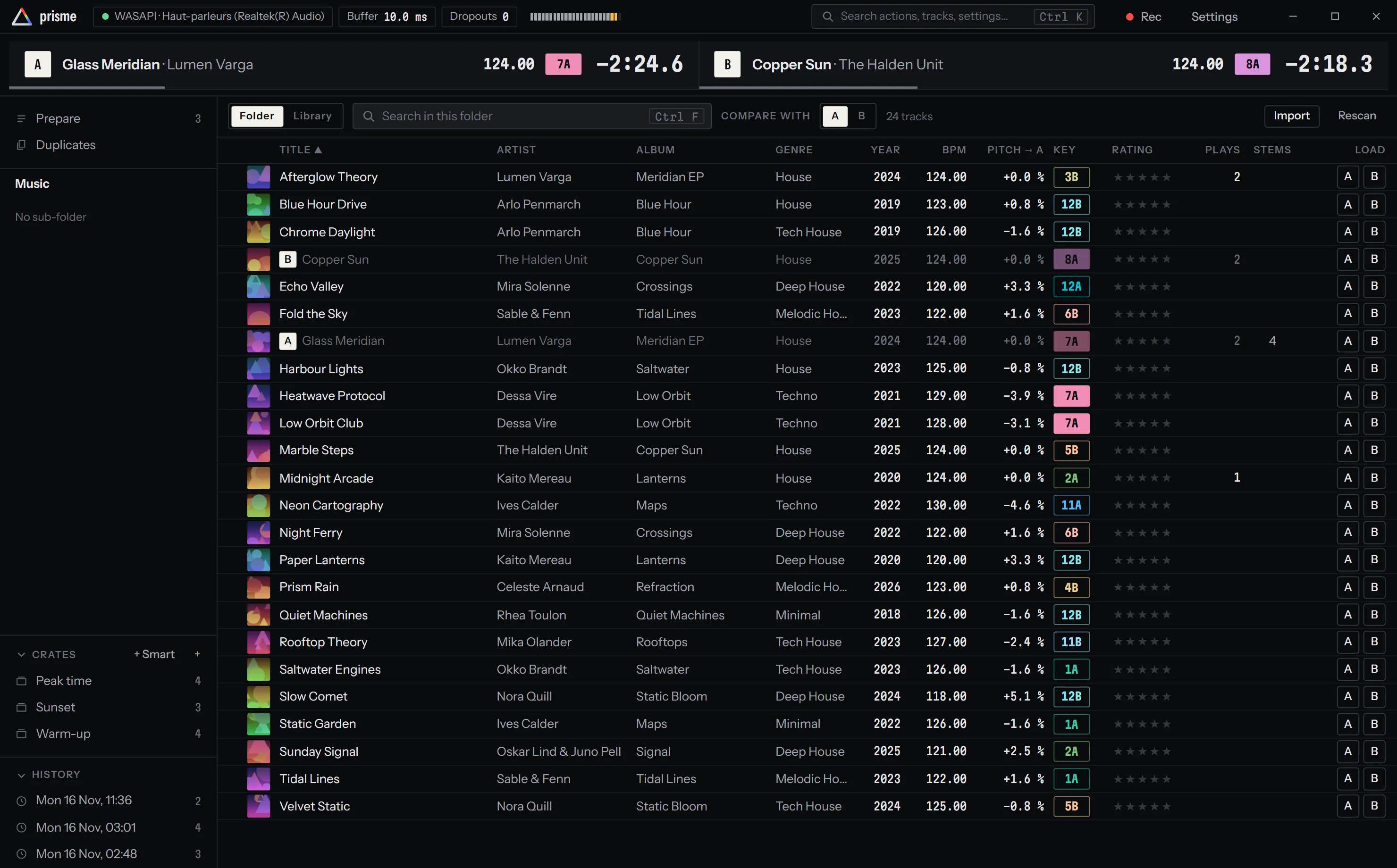
Section titled “The library over the whole window”To prepare a set, or to browse while a long track plays, give the whole window to the library. The decks go out of sight and a line over the library keeps each one in view: its letter, filled while it plays, the title and the artist, the BPM, the key, the time remaining and a thin line of how much has played.
-
Press Ctrl K and type library.
-
Choose The library over the whole window.
-
Do the same to bring the decks back.
A controller can do it with a key: map The library over the whole window, in the General group, with MIDI learn.
Decks on the screen below
Section titled “Decks on the screen below”On a laptop with two screens, or with a screen set under the main one, Prisme can spread over both: the library on the main screen, the decks on the screen below, under your fingers.
-
Set the second screen under the main one in your system’s display settings.
-
Open Settings > Interface and turn on Decks on the screen below.
The window then covers both screens. The main screen shows the line of what plays over the library; the decks fill the screen below, at that screen’s own scale, their waveforms growing with its height. When the screen below is too low for whole lanes, they become compact, as with four decks.
The setting is greyed out, with No screen under this one., when the system knows no screen below. Prisme remembers your choice and spreads again at the next start if the screen is there.
Window size
Section titled “Window size”The window needs at least 1280 × 640 pixels: a 1080p laptop screen at 150 % scaling. Below 1400 pixels wide, the rail of each deck tightens: narrower keys, smaller stem knobs and pad labels. Everything stays on screen.