
Setting up timecode vinyl
Setting up vinyl control takes three things: the turntables wired to inputs Prisme can hear, the right timecode chosen in the settings, and each deck handed to its record. The Turntables page of the settings shows the signal of every turntable as it comes in, so you can check each step as you go.
Wire the turntables
Section titled “Wire the turntables”-
Plug the left and right cables of turntable A into inputs 1 and 2 of your sound card, and those of turntable B into inputs 3 and 4. Keep left on the odd input and right on the even one.
-
Screw the ground wire of each turntable to the ground post of the interface or of the mixer. A missing ground is the first cause of hum.
-
If your interface has a phono/line switch per input, set it to phono for a turntable, line for a CD player.
-
Plug the outputs: with a hardware mixer, outputs 1-2 into the channel of deck A and 3-4 into the channel of deck B, each set to line. With Prisme’s software mixer, outputs 1-2 go to the speakers and 3-4 to the headphones.
-
Put the timecode records on the platters, both on the same side (A or B).
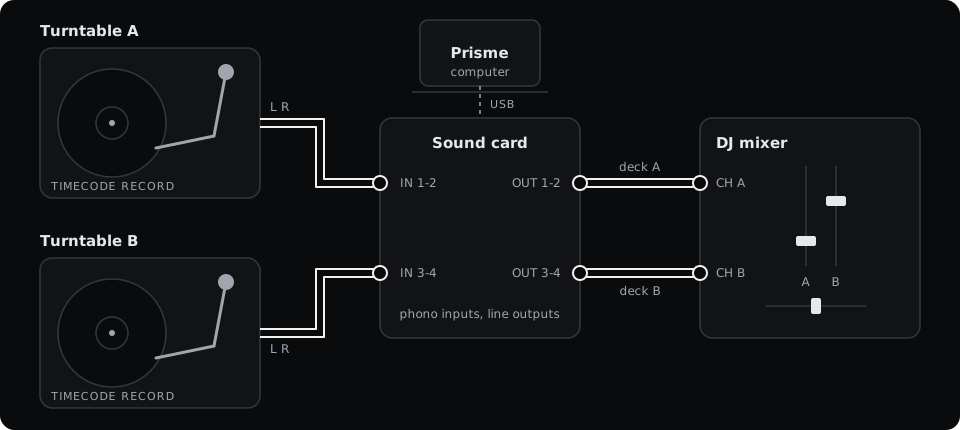
Phono or line
Section titled “Phono or line”A turntable’s cartridge gives a very weak signal, made to go through a phono preamplifier. Prisme does not amplify it: the timecode has to reach the sound card already brought up.
- Interface with phono inputs (most DJ interfaces made for DVS): plug the turntable straight in, switch set to phono.
- Interface with line inputs only: put a phono preamplifier between the turntable and the card, or raise the input gain of a card that has one until the signal reads well (see Read the signal).
- CD player with the control CD: line level already, into a line input.
Below about −50 dBFS Prisme hears no timecode at all; too much gain clips the signal and distorts it. Aim for a full Level bar without clipping.
Choose the sound card
Section titled “Choose the sound card”-
Open Settings (Ctrl ,, or Cmd , on a Mac) and go to Audio. Choose the Driver type and the Output as described in Audio setup. ASIO on Windows, Core Audio on a Mac and JACK on Linux answer fastest, which matters with a record under your hand.
-
Go to Turntables. Under Input (DVS interface), choose your interface. With ASIO, or a USB card driven by Prisme on a phone, outputs and inputs are one device: the row reads Turntables plugged into the inputs of this driver and is a switch to turn on.
-
Under Control vinyl, choose the timecode on your records: Serato CV02 side A, Serato CV02 side B or Serato control CD.
-
A bar appears at the bottom: The audio restarts to apply these changes. Press Apply. (Undo puts the settings back as they were.)
Choose the inputs
Section titled “Choose the inputs”Prisme gives each deck a fixed pair of inputs; there is nothing to assign by hand.
| Deck | Inputs |
|---|---|
| A | 1-2 |
| B | 3-4 |
| C | 5-6, on a card with at least eight inputs |
| D | 7-8, on a card with at least eight inputs |
With four decks on a card with fewer inputs (Settings, DJ, Decks), deck C reads the turntable of deck A and deck D that of deck B, as the layers of a two-deck controller. Only one deck of each pair follows the turntable at a time: putting deck C on REL or ABS takes the turntable from deck A, which leaves the record and goes back to INT, and the other way round. The deck that leaves the record plays on by itself as the record played it: at its tempo, which its tempo fader moves to, and in its direction (stopped if the record stood still).
Inputs the turntables leave free can take a microphone or an aux line, see Microphone and aux inputs.
Read the signal
Section titled “Read the signal”Settings, Turntables shows a panel for each deck, Turntable A, Turntable B and so on. Each has a scope and four readings.
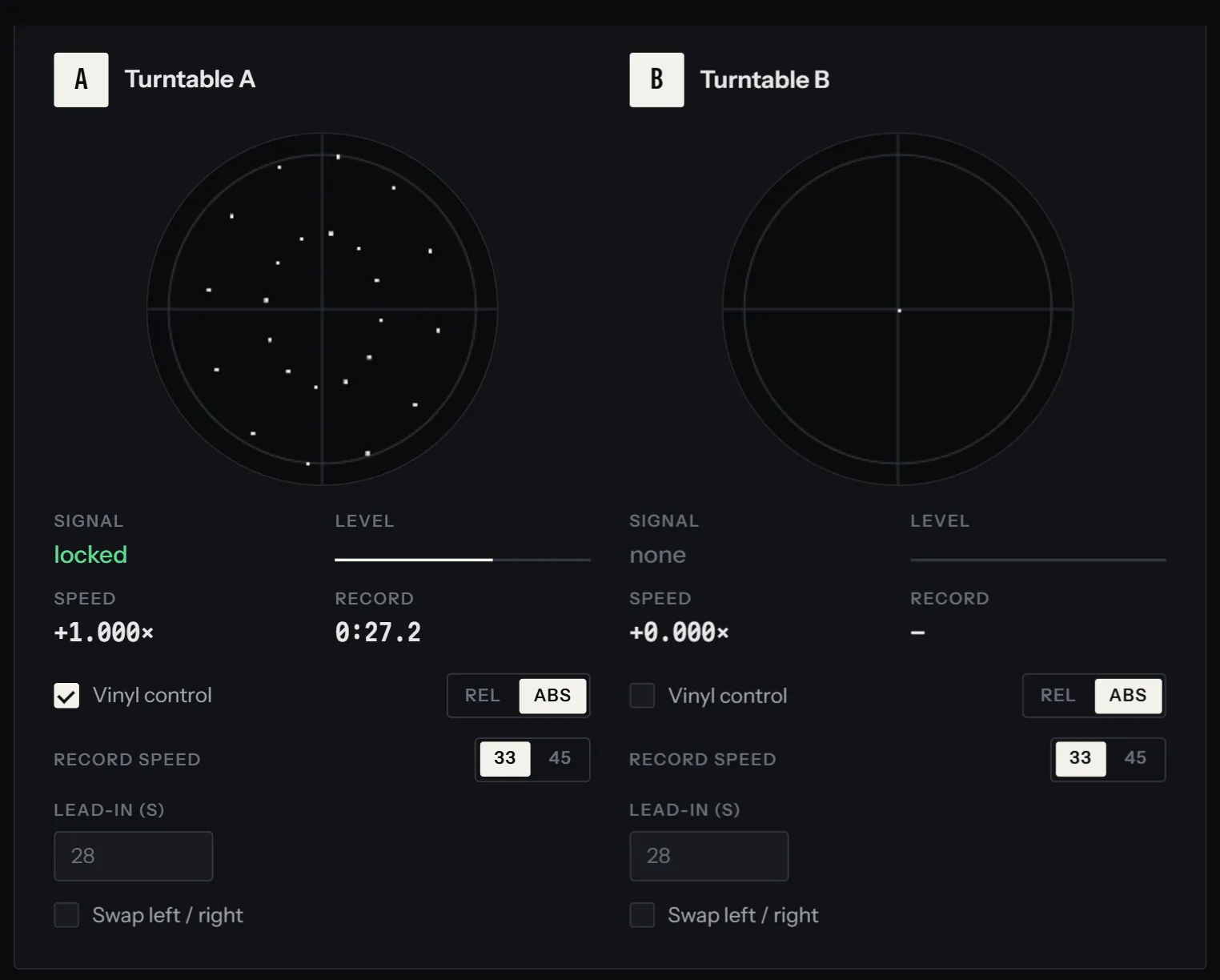
The scope draws the left channel across and the right channel up. A clean timecode traces a round circle while the record turns. The scope zooms by itself to follow the level, so the size of the circle tells you nothing; its shape does:
| What you see | What it means |
|---|---|
| A thin, round circle | A clean signal. |
| A thick or fuzzy ring | Noise or hum on the signal. |
| A flattened ellipse or a line | One channel weak or missing, a cable or a cartridge to check. |
| A dot in the middle | No signal: record stopped, needle up, or nothing plugged in. |
Signal tells what the decoder hears:
- locked: a clean timecode.
- unsteady: the signal dropped for a moment while the record turned, a needle bounce for instance. Prisme holds the speed through it.
- none: no usable signal.
Level is the strength of the timecode. A full bar is what a healthy line-level timecode gives; a bar that barely moves means too little gain.
Speed is how fast the record turns compared with the speed that plays the track at its
own tempo: +1.000× is normal play, −1.000× the same speed backwards, +0.000× stopped.
Record is where the needle is on the record, in minutes and seconds of music. It reads
— until Prisme has found the position, which takes a short stretch of clean play.
There is no calibration to run. The decoder follows the level of each record as it changes, learns how the signal of your cartridge grows with the speed, and adjusts as you play.
Hand a deck to its record
Section titled “Hand a deck to its record”A deck plays by itself (INT) until you hand it to its turntable. On each deck card, next to the track title, four buttons choose who drives the deck:
| Button | The deck |
|---|---|
| INT | plays by itself, with its PLAY button and tempo fader. |
| REL | follows the speed of the record. |
| ABS | follows the speed and the position of the record. |
| THRU | plays its inputs as they come: a real record, a CD player. |
The buttons show once Prisme reads turntables (or simulates one). Press REL or ABS and the deck follows the record at once; press INT to take it back, and it plays on at the record’s tempo, in its direction. On a phone, the same choice is at the top of the deck’s panel, under Deck A · driven by: Itself, Vinyl REL, Vinyl ABS, Its input.
From a controller or the keyboard, the action Vinyl control turns the record on or off for a deck, in the mode it was last in, and Passthrough: the deck plays its input switches THRU. Find them in the command palette or map them with MIDI learn.
Which mode to choose is the subject of Absolute and relative modes.
The settings of each turntable
Section titled “The settings of each turntable”The panel of each turntable, in Settings, Turntables, holds the settings of its deck. They are kept for the next start.
| Setting | What it does | Default |
|---|---|---|
| Vinyl control | The deck follows its record. Same as REL or ABS on the deck card. | Off |
| REL / ABS | The mode the record drives the deck in. | ABS |
| Record speed | 33 or 45: the speed the record turns at when the track plays at its own tempo. | 33 |
| Lead-in (s) | Where the track starts on the record, in absolute mode. Empty: the record’s own. | The record’s own |
| Swap left / right | The left and right cables are crossed: Prisme swaps them back. | Off |
Record speed: 33 or 45
Section titled “Record speed: 33 or 45”Set 45 if you play the record at 45 rpm. The track then plays at its own tempo with the platter at 45, and spreads over 35 % more groove: finer control under the hand, less music per side (about 7 minutes on side A instead of 10). Changing it, Prisme learns the tempo of the platter again.
Lead-in
Section titled “Lead-in”In absolute mode, the start of the track sits a little way into the record, so that you can put the needle down in the first grooves and let the track begin on its own. The Serato records start the track 28 seconds in; the control CD at its very beginning. Those 28 seconds are the record’s at 33 rpm: at 45 the grooves go by 1.35 times faster, and the track starts 20.7 seconds of music in. The field shows, greyed out, the value used at the record speed chosen. Type another number of seconds to move the start of the track, or empty the field to go back to the record’s own. Before that point the deck plays silence, the track waiting at its start.
Swap left / right
Section titled “Swap left / right”If the record reads backwards while the platter turns forwards, its left and right cables are crossed. Prisme notices it after about five seconds of steady backward play: the panel shows The record has been playing backwards for a while: if the platter turns forwards, the left and right cables are crossed. with a Swap left / right button, and the deck card’s light warns Left and right cables crossed? See Settings, Turntables. Swap the cables, or turn the swap on.
Check the latency
Section titled “Check the latency”The time from the platter to the speakers is what you feel when you nudge or scratch. In Settings, Audio, Latency measures it on your own setup: join an output to an input with a cable, choose them, and press Measure. Prisme plays clicks at full level for a few seconds, so keep speakers and headphones off that output. See Timecode troubleshooting to bring it down.